






- SportsDB Player ID: 34217595
- Team ID: 10
- Player Name: Bernard Kamungo
- Position: Midfielder
- Nationality: Tanzania
- Date of Birth: 01/01/1970
- Height: 175 cm
- Weight: 150 lbs
- Photo: https://r2.thesportsdb.com/images/media/player/cutout/117x6j1766513144.png
-
Description: Bernard Kamungo (born 1 January 2002) is a Tanzanian professional footballer who plays as a midfielder for Major League Soccer club FC Dallas.
Club career
Born in Kasulu, Kamungo and his family had lived in a refugee camp before being able to relocate to the United States and settle in Abilene, Texas. After moving to the United States, Kamungo was a member of the Abilene High School soccer team. Following his graduation from high school, Kamungo, alongside his brother Imani, began searching online for potential tryouts for Bernard. After seeing tryouts elsewhere with participation fees as high as $500, Imani found a tryout with North Texas SC, the reserve team for MLS side FC Dallas, for only a $90 fee. During that January 2021 trial, Kamungo impressed North Texas head coach Eric Quill and was signed to a professional contract on 25 March.
On 24 April 2021, Kamungo made his debut against Fort Lauderdale CF, coming on as a 71st minute substitute for Hope Avayevu. Eight minutes after coming onto the pitch, Kamungo scored his first professional goal as the match would end in a 4–2 victory.
On 30 August 2022, Kamungo signed a four-year contract with FC Dallas.
On April 15, 2023, he scored his first goal against Real Salt Lake in the 88th minute, which turned out to be the winning goal in a 2–1 FC Dallas victory.
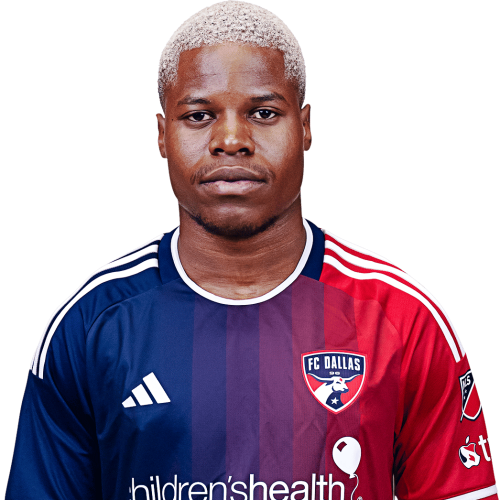
Bernard Kamungo is a Tanzania midfielder currently listed with FC Dallas in Major League Soccer.
Bernard Kamungo MLS Profile
- Club: FC Dallas
- Position: Midfielder
- Nationality: Tanzania
- Date of Birth: 2002-01-01
- Height: 175 cm
- Weight: 150 lbs
About Bernard Kamungo
Bernard Kamungo (born 1 January 2002) is a Tanzanian professional footballer who plays as a midfielder for Major League Soccer club FC Dallas.
Club career
Born in Kasulu, Kamungo and his family had lived in a refugee camp before being able to relocate to the United States and settle in Abilene, Texas. After moving to the United States, Kamungo was a member of the Abilene High School soccer team. Following his graduation from high school, Kamungo, alongside his brother Imani, began searching online for potential tryouts for Bernard. After seeing tryouts elsewhere with participation fees as high as $500, Imani found a tryout with North Texas SC, the reserve team for MLS side FC Dallas, for only a $90 fee. During that January 2021 trial, Kamungo impressed North Texas head coach Eric Quill and was signed to a professional contract on 25 March.
On 24 April 2021, Kamungo made his debut against Fort Lauderdale CF, coming on as a 71st minute substitute for Hope Avayevu. Eight minutes after coming onto the pitch, Kamungo scored his first professional goal as the match would end in a 4–2 victory.
On 30 August 2022, Kamungo signed a four-year contract with FC Dallas.
On April 15, 2023, he scored his first goal against Real Salt Lake in the 88th minute, which turned out to be the winning goal in a 2–1 FC Dallas victory.
Bernard Kamungo Discussion
Discuss Bernard Kamungo, FC Dallas, MLS performances, transfers, goals, highlights, and Major League Soccer news on MLS Forums.
There are no reviews to display.